Mount Seedr as a Drive (FTP, SFTP, WebDAV)

Mounting turns Seedr into a normal folder on your machine. Your file manager, video player, or media server sees the files like they are on a local drive — no uploads, no downloads, just a remote filesystem.
This works the same on Seedr V1 and V2.
What this gets you
- A real drive letter (Z:) or folder path (/mnt/seedr) backed by your Seedr account.
- Open, copy, and stream files from any app that talks to the filesystem — VLC, Plex, Infuse, Finder, Explorer.
- One mount, every app sees it. No per-app reconfiguration.
What you need
Premium plan (FTP/SFTP on Pro and above, WebDAV on Master and above), plus a client for your OS. The endpoints:
| Protocol | Host | Port | Plan | |----------|------|------|------| | SFTP (best overall) | sftp.seedr.cc | 2222 | Pro+ | | FTP / FTPS | ftp.seedr.cc / ftps.seedr.cc | 21 | Pro+ | | WebDAV | https://dav.seedr.cc | 443 | Master+ |
Credentials = your Seedr email + password, or a dedicated FTP/WebDAV password from Account → Security.
Pick a protocol
- SFTP — most reliable, fast folder listings, works across restrictive networks. Best default.
- WebDAV — cleanest on macOS (built into Finder) and for apps that prefer HTTP.
- FTP / FTPS — widely supported by older tools and NAS devices. Slower on huge folder listings.
Setup, step by step
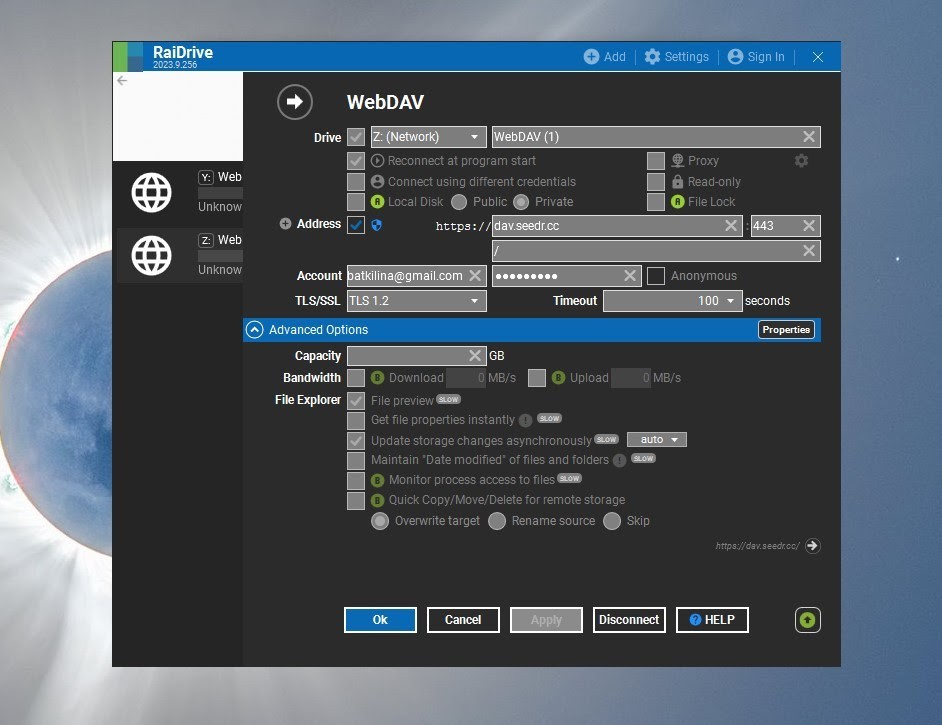
Windows — RaiDrive (any protocol)
- Install RaiDrive.
- Add → pick SFTP, FTP, or WebDAV.
- Fill the host + port from the table above.
- Account = Seedr email. Password = Seedr password.
- Assign a drive letter, e.g. Z:.
- Tick Connect at sign-in so it remounts on boot.
CLI alternative (Windows PowerShell) — net use works for WebDAV:
`` net use Z: https://dav.seedr.cc /user:you@example.com yourpassword /persistent:yes ``
macOS — Finder (WebDAV) or CLI (SFTP/FTP)
Finder (WebDAV, no extra apps)
- Finder → Go → Connect to Server (⌘K).
- Enter https://dav.seedr.cc.
- Sign in with your Seedr credentials.
- The mount appears in the sidebar under Locations.
CLI (SFTP via `sshfs`)
`` brew install macfuse sshfs mkdir -p ~/seedr sshfs -p 2222 you@example.com@sftp.seedr.cc:/ ~/seedr -o reconnect ``
Linux — GNOME Files (Nautilus), KDE Dolphin, or CLI
GNOME Files (Nautilus, WebDAV or SFTP)
- Open Files.
- Sidebar → Other Locations → Connect to Server (bottom of window).
- Enter one of: - davs://dav.seedr.cc (WebDAV) - sftp://you@example.com@sftp.seedr.cc:2222
- Enter password when prompted.
KDE Dolphin — same idea. Location bar:
`` webdavs://dav.seedr.cc sftp://you@example.com@sftp.seedr.cc:2222 ``
CLI (SFTP via `sshfs`)
`` sudo apt install sshfs mkdir -p /mnt/seedr sshfs -p 2222 you@example.com@sftp.seedr.cc:/ /mnt/seedr -o reconnect,allow_other ``
CLI (WebDAV via `davfs2`)
`` sudo apt install davfs2 sudo mkdir -p /mnt/seedr sudo mount -t davfs https://dav.seedr.cc /mnt/seedr ``
Add to /etc/fstab with credentials in /etc/davfs2/secrets for persistence.
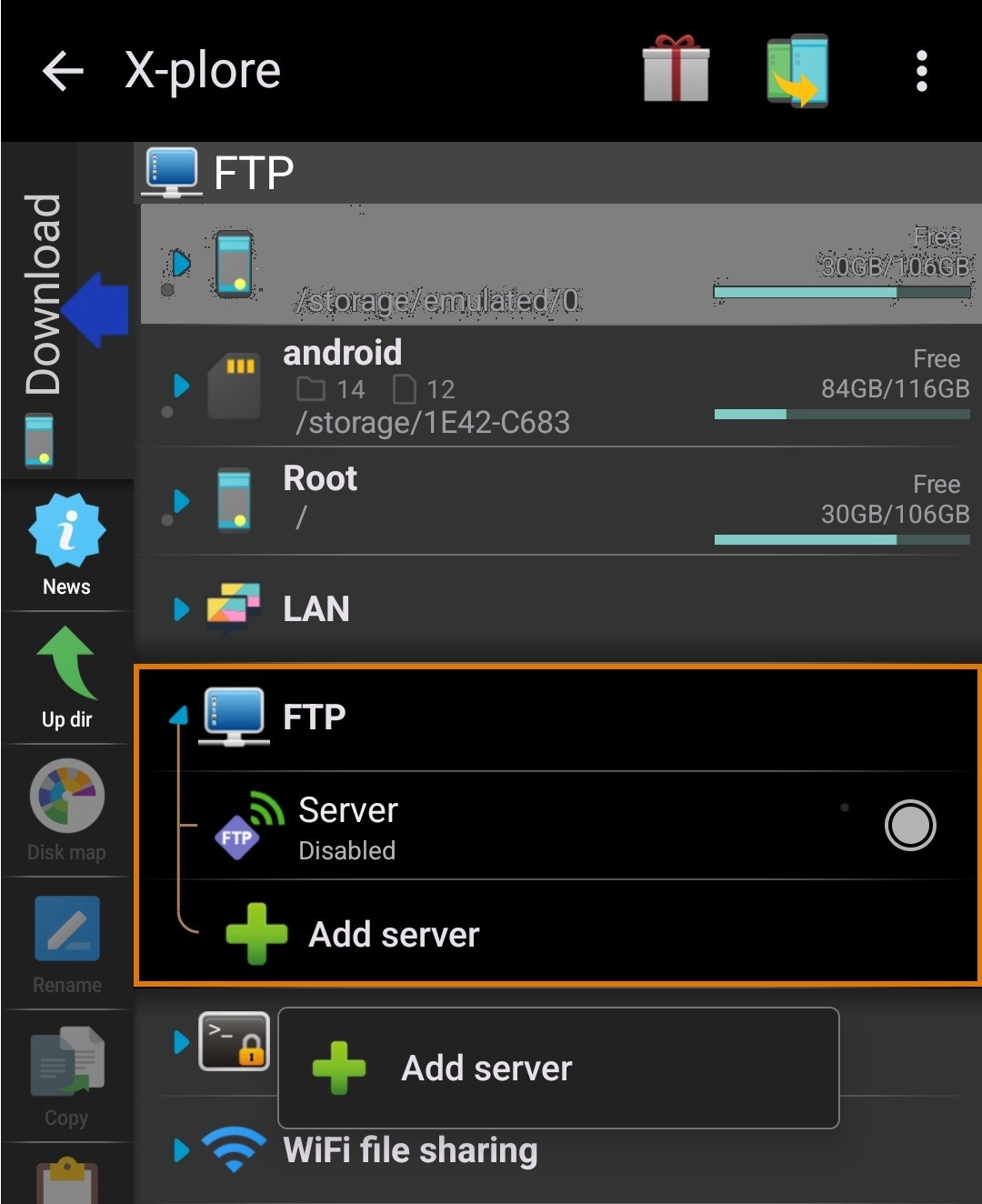
Android — X-plore (FTP)
- Open X-plore → Add server.
- Protocol: FTP.
- Host ftp.seedr.cc, port 21.
- Seedr email + password.
WebDAV is available in some X-plore builds; FTP is always there.
Troubleshooting
- "Connection refused" / "Timeout" — your network blocks the port. Try another protocol: if FTP (port 21) fails, switch to SFTP (port 2222). If SFTP fails, WebDAV over HTTPS (443) almost always gets through.
- Works on phone hotspot, fails on home Wi-Fi — router or ISP filter. Same fix: switch protocol. WebDAV over 443 is the one that rides through corporate and dorm networks.
- "Authentication failed" — you generated a dedicated FTP/WebDAV password in Seedr settings and are typing the regular account password. Check Account → Security.
- WebDAV is slow in huge folders — WebDAV re-fetches directory listings on every open. Split a big folder (thousands of files) into subfolders, or switch that library to SFTP.
- Windows Explorer WebDAV says "file size exceeds the limit" — Windows' built-in WebDAV client caps file sizes to 50 MB by default. Raise FileSizeLimitInBytes under HKLM\SYSTEM\CurrentControlSet\Services\WebClient\Parameters, or use RaiDrive instead.
- Mount disappears after sleep on macOS — Finder drops WebDAV mounts on sleep. Use Mountain Duck for a persistent mount, or remount via a LaunchAgent.
- Linux `sshfs` disconnects after idle — mount with -o reconnect,ServerAliveInterval=15.
What works well, and known limits
Works well
- Streaming video to VLC, IINA, Plex, Jellyfin, Infuse, Kodi — direct byte-range reads, no full download.
- Browsing and drag-dropping files in your OS file manager.
- NAS mounts (Synology, QNAP) pointing their FTP remote-folder feature at ftp.seedr.cc.
Known limits
- Random writes into an already-open file (e.g. editing a video in place) are not supported. Read + full-rewrite works.
- Folder listings over WebDAV slow down past a few hundred files. SFTP listings are faster.
- Concurrent streams and total bandwidth are capped by your Seedr plan.
- On Free-tier accounts these mount endpoints are not available. Mounting is a Premium feature.
Wrap
Pick SFTP unless you have a specific reason to pick something else. Mount once, use every app you already have. It is the single most useful thing you can set up with Seedr.
Turn Seedr into a drive
Was this article helpful?
Related Articles
Connect Seedr to Plex via FTP (Pro plan guide)
Set up Seedr with Plex via FTP connection. Access your cloud files in Plex for seamless media viewing.

Connect Seedr and Plex with WebDAV (Full Guide)
Connect Seedr to Plex using WebDAV. View your cloud saves directly through Plex without local storage.

How to open HEIC photos online on Windows, Android, or any browser
Open iPhone HEIC photos from any device in Seedr’s cloud viewer — no conversion, no codecs, no extra apps — and keep them organized alongside your other files.