Use the Seedr Roku plugin — install and setup

Roku is a closed-enough platform that getting a custom app on it takes more steps than a Fire TV or a Shield. The Seedr Roku plugin works by using Roku's Developer Mode to side-load the channel from your computer. Once it is in, it behaves like any other Roku channel — open Seedr, pick a file, press Play.
The installation is not hard, but it is timing-sensitive in one spot. This guide makes sure you don't get stuck there.
What this gets you
- Your Seedr cloud library as a proper Roku channel, ready to play your personal videos and recordings on the TV remote, without a phone or laptop in the loop.
- Playback on the Roku hardware you already have — no extra box.
- QR-code login, so you don't have to type a password with a remote.
- No running media server on your home network. Seedr is the server.
What you need
- A Roku device. Roku Express 4K+, Ultra, Streambar — anything from the last five years works.
- The Seedr Roku plugin ZIP (download from your Seedr account).
- A computer on the same Wi-Fi network as the Roku.
- A Seedr account. Free plan works for setup; HD/4K playback needs a premium plan.
- 10 minutes. The sideload is a one-time thing.
Setup, step by step
Step 1 — Enable Developer Mode on Roku
This is the timing-sensitive step. The button sequence must be pressed in one continuous motion — if you pause, the Roku just navigates its menu and nothing happens.
- From the Roku Home screen, press this sequence with your remote without pausing:
Home → Home → Home → Up → Up → Right → Left → Right → Left → Right
- If the timing was right, the hidden Developer Settings screen appears.
- Select Enable installer and restart.
- Roku reboots.
- After the reboot, repeat the same button sequence.
- You will be prompted to Create a password. Write it down; you will need it in a minute.
- Note the Developer IP address shown on screen (something like 192.168.1.24).
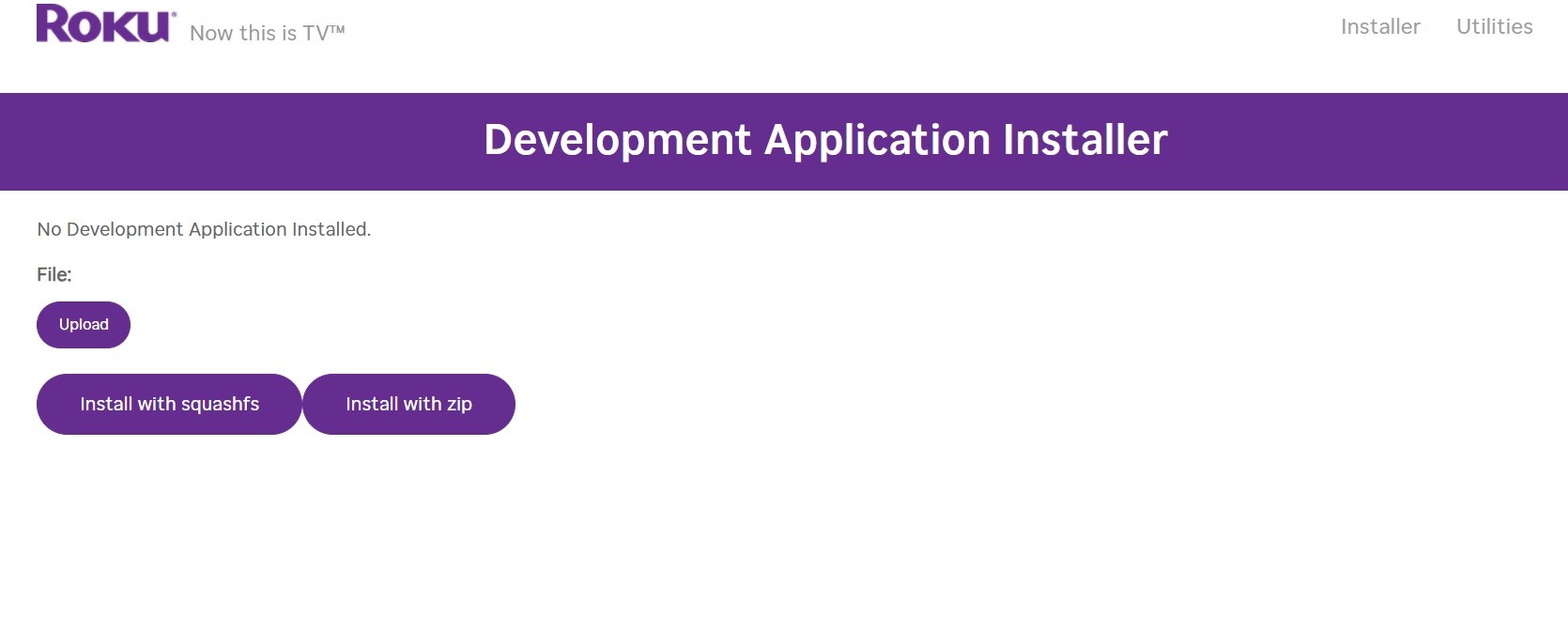
If Developer Mode does not appear, the timing was off. Go back to Home and press the sequence faster.
Step 2 — Install the Seedr plugin
- Download the Seedr Roku plugin ZIP . Save it somewhere memorable.
- On your computer (same Wi-Fi as the Roku), open a browser and go to:
http://YOUR_ROKU_IP — replace with the IP from step 1.
- A login appears. Enter: - Username: rokudev - Password: the one you just created.
- Click Choose file, select the Seedr ZIP, then click Install.
- Wait for the confirmation message. It is quick.
- Press Home on your Roku remote. Seedr now appears in your channel list.
Step 3 — First launch and login
- Open Seedr on the Roku.
- A QR code appears. Scan it with your phone's camera.
- Your phone opens a Seedr login page; sign in and approve.
- The Roku flips to the library view.
If you do not have a phone handy, the plugin also shows a short URL + code for manual web login. Same flow, less convenient.
Troubleshooting
- Developer Mode screen never appears. Timing issue. Go back to Home, press the sequence faster and without pausing between buttons.
- `http://YOUR_ROKU_IP` doesn't load. Computer and Roku are on different networks. If you use Wi-Fi + Ethernet or a guest network, move to the same Wi-Fi and retry. Confirm the IP via Settings → Network → About on the Roku.
- "401 Unauthorized" on the installer page. Developer password is wrong. You can reset it by disabling and re-enabling Developer Mode (same button sequence, then Disable installer, then enable again with a new password).
- ZIP uploads but "invalid manifest" error. You grabbed the wrong file or it was partially downloaded. Re-download the ZIP from your Seedr dashboard.
- Seedr launches but QR code never resolves. Your Roku cannot reach the internet, or the Seedr auth servers are unreachable. Restart the router, try a mobile hotspot to isolate.
- Video plays but stutters. You are probably on Wi-Fi with weak signal. Plug Roku into Ethernet (Roku Ultra only), drop the quality in the Seedr player, or move the router closer.
What works well and what does not
Works well:
- 1080p playback on any modern Roku with a premium Seedr plan.
- QR-code login — no remote-typing misery.
- Folder navigation and resume-playback across sessions.
- Same Seedr account on Roku, web, phone and other integrations (Jellyfin, Kodi, etc.).
Known limits:
- Free plan streams to Roku at lower resolutions. For HD/4K, premium.
- 4K support depends on your Roku model. Older Express and Stick models top out at 1080p regardless of source.
- No ATV/HDR passthrough for arbitrary codecs — you get what the Roku's built-in decoder supports. Convert exotic files to H.264 or H.265 in Seedr before viewing if something refuses to play.
- Developer Mode persists until reset. If you factory-reset the Roku, you redo the setup.
Wrap
Sideload once, log in with a QR code, and your Seedr library is a Roku channel forever.
Unlock HD and 4K on your Roku
Was this article helpful?
Related Articles
Connect Seedr to Plex via FTP (Pro plan guide)
Set up Seedr with Plex via FTP connection. Access your cloud files in Plex for seamless media viewing.

Connect Seedr and Plex with WebDAV (Full Guide)
Connect Seedr to Plex using WebDAV. View your cloud saves directly through Plex without local storage.

Plex for Beginners: Install, Libraries, and Seedr
Getting started with Plex media server. Organize and view your entire media library across all your devices.