Connect Seedr to Jellyfin over WebDAV (step by step)
Jellyfin is the open-source answer to Plex: it scrapes your media, builds a library with posters and metadata, and streams to any device on your network. Point it at a Seedr mount and you have a private media server backed by cloud storage — no local NAS, no files sitting on your own disks.
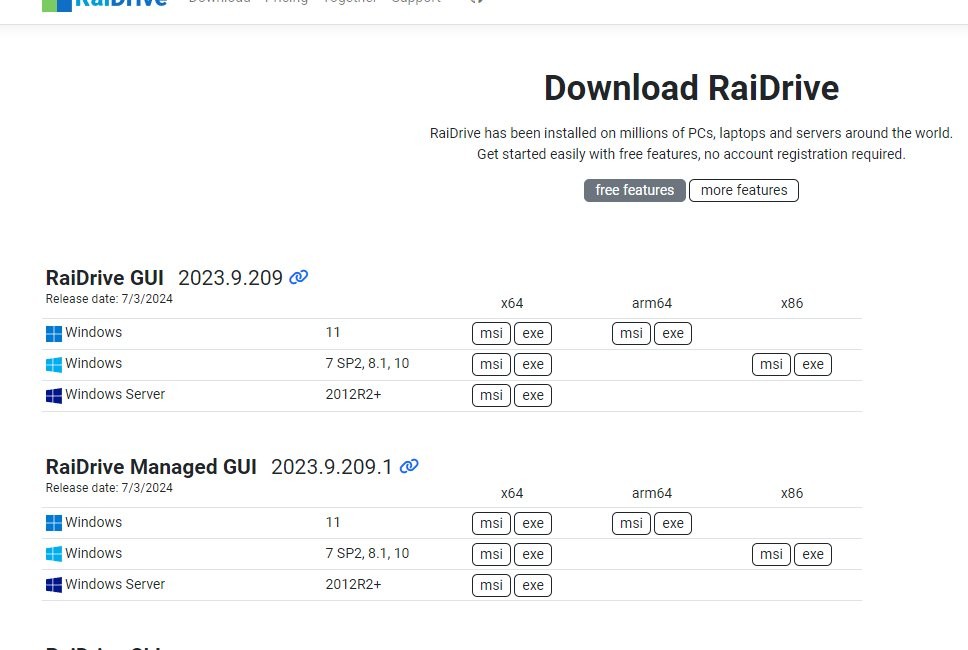
This guide uses WebDAV because it is the most reliable path and it is built into both Windows and macOS. RaiDrive is the helper that makes it behave like a real drive letter for Jellyfin to read.
What this gets you
- Your Seedr library shows up as a Jellyfin library with posters, descriptions and subtitles.
- Playback on any Jellyfin client: TV apps, phones, browser, Roku, Fire TV, Kodi.
- No files copied to your server. Jellyfin reads straight from the cloud on demand.
- Subtitles, multi-language audio tracks and chapter markers, handled by Jellyfin like any other library.
What you need
- A Seedr Master plan. WebDAV read/write needs Master or above.
- A machine to run Jellyfin: Windows, macOS, Linux or Docker. Any version from the last 12 months.
- RaiDrive (free tier is enough) on the same machine, if you are on Windows. On macOS/Linux you can use the native WebDAV mount or rclone mount instead.
- Your Seedr email and password (not a Facebook-only login — set an email first via support if you use Facebook).
Setup, step by step
Part 1 — Mount Seedr as a local drive
Windows with RaiDrive
- Install RaiDrive. Launch it.
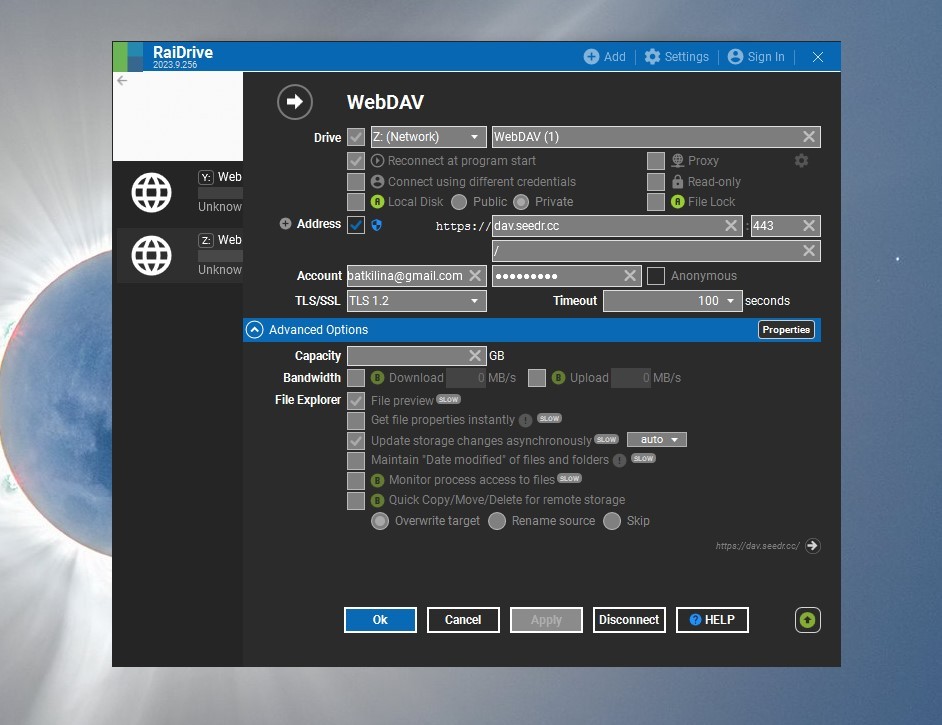
- Click Add (top-left).
- Pick NAS → WebDAV.
- Fill in: - Address: dav.seedr.cc - Port: 443 - Path: leave blank - HTTPS: on (required) - Drive letter: pick anything free. Z: is the convention. - Account / Password: your Seedr credentials
- Click Connect. RaiDrive mounts the drive. Open This PC — Z: now shows your Seedr folders.
macOS native
- Finder → Go → Connect to server (Cmd+K).
- Server address: https://dav.seedr.cc.
- Enter Seedr email and password.
- The mount appears under Locations.
Linux with rclone
- rclone config → n for new remote, type webdav.
- URL https://dav.seedr.cc, vendor other, user and pass are your Seedr credentials.
- Mount with rclone mount seedr: /mnt/seedr --vfs-cache-mode writes.
Part 2 — Add the mount to Jellyfin
- Open Jellyfin dashboard in your browser.
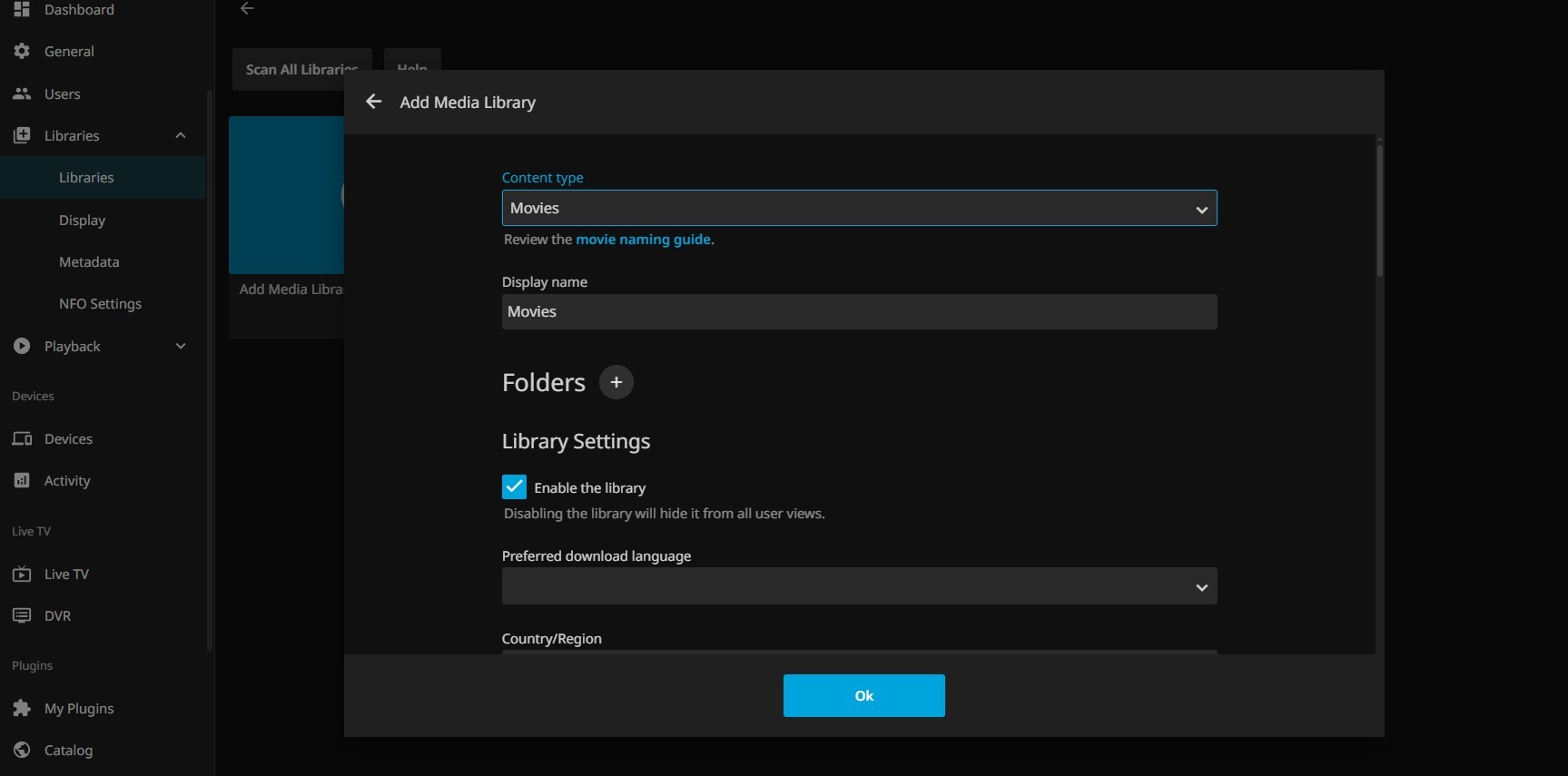
- Go to Libraries → Add Media Library.
- Pick the content type (Movies, Shows, Music, etc.).
- Name the library (e.g. Seedr Movies).
- Click + next to Folders and browse to your mount: Z:\ on Windows, /Volumes/dav.seedr.cc/ on macOS, /mnt/seedr on Linux.
- Leave the metadata scrapers at their defaults for a first pass.
- Click Ok → Save.
Jellyfin kicks off a scan. First scan takes roughly five minutes per hundred items; subsequent scans are incremental.
Troubleshooting
- Jellyfin logs "Access to the path is denied". Jellyfin's service account cannot see the WebDAV mount. On Windows, RaiDrive mounts per-user by default — switch the Jellyfin service to run as your user (Services → Jellyfin → Log On tab), or mount the drive system-wide in RaiDrive's settings.
- "Path not found" during library scan. The drive letter is not persistent across reboots. In RaiDrive, tick Auto mount at Windows start for the Seedr entry.
- Library scans forever, never finishes. Too many items in a single folder. Seedr scales fine; Jellyfin's scanner slows on flat folders with 1000+ files. Split your media into subfolders (Movies/A-M/, Movies/N-Z/).
- Playback buffers and drops. Usually a transcoding issue on the Jellyfin host: a weak CPU trying to convert H.265 10-bit for a Chromecast. Check Playback → Dashboard in Jellyfin: if transcoding is active, you are CPU-bound, not Seedr-bound. Enable hardware acceleration, or direct-play on a capable client.
- Random "connection lost" during playback. Your WebDAV session dropped. RaiDrive and rclone both reconnect automatically; if it is happening often, check Advanced → Keep alive in RaiDrive (enable) and make sure your home router is not killing idle TCP connections.
- 4K plays fine on the server's browser but stutters on a TV. That's transcoding again. Make sure the client can direct-play your codec, or encode a 1080p copy.
What works well and what does not
Works well:
- 1080p playback on modern Jellyfin clients with direct play.
- Posters, subtitles, multi-language audio.
- One mount, many players: the same Seedr mount can back Jellyfin, Plex, Kodi and Infuse on your own devices at the same time.
- Private viewing — Seedr fetches files on your behalf, Jellyfin plays over HTTPS.
Known limits:
- 4K H.265 needs a direct-play-capable client. Transcoding 4K on a mini-PC will melt.
- Scan performance depends on Jellyfin's host CPU and disk, not Seedr.
- RaiDrive free tier has a connection-count limit; if you run dozens of libraries, the paid tier or rclone is worth it.
- Offline playback is a Jellyfin client feature, not a Seedr one. Works only on clients that support sync.
Wrap
One mount, one library add, and your Seedr cloud becomes your Jellyfin backend. No local storage, no NAS, no syncing.
Unlock WebDAV with Seedr Master
Was this article helpful?
Related Articles

How to open HEIC photos online on Windows, Android, or any browser
Open iPhone HEIC photos from any device in Seedr’s cloud viewer — no conversion, no codecs, no extra apps — and keep them organized alongside your other files.
Connect Seedr to Infuse (iOS, tvOS, macOS)
Learn how to easily connect your Seedr account to the Infuse app using WebDAV or FTP. View 4K media directly to your Apple TV or iOS device without saving.
Three ways to add links and files in Seedr V2
Learn how to use Seedr V2’s Link button to add media links, scan webpages, upload files from your device, and share to Seedr via PWA or browser extensions.