Playback speed control in Seedr V2
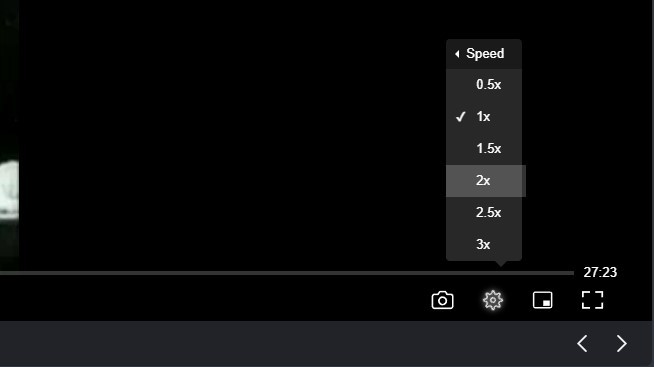
Seedr V2's browser player now supports playback speeds from 0.5x to 3x. Slow a tutorial down to catch a step. Skim a lecture at 1.5x. Switch speeds mid-video without reloading.
Why we built this
Fixed-speed playback is a hassle in three situations people hit often:
- Tutorials and lectures — complex sections are easier at 0.5x. Already-known material wastes time at 1x.
- Language listening — non-native speakers need slower audio to parse dialogue clearly, and to read subtitles comfortably.
- Podcasts and long interviews — 1.5x or 2x clears a 90-minute episode in roughly 45–60 minutes.
Before V2, Seedr's built-in player had no speed control. You had to save the file locally and open it in VLC or another desktop player. That works, but it defeats the point of cloud playback.
What's new
The V2 player adds an on-the-fly speed menu:
- Speeds available: 0.5x, 1x, 1.5x, 2x, 2.5x, 3x.
- Works on: any video or audio file Seedr's player can open — MP4, MKV, MP3, FLAC, M4A, and more.
- No reload: switch speeds during playback without restarting the file.
- Keyboard friendly: the menu is reachable from the player's standard controls.

Before V2: open file, realise it's too fast, save it, open in VLC, skip to the right point. After V2: click the speed icon, pick the pace, keep watching.
How to use it
- Open any video or audio file from your Seedr cloud.
- Start playback.
- Click the playback speed icon in the player controls.
- Pick a speed from the menu.
The player applies the change immediately and remembers it for the rest of the session. Open a new file and it starts at 1x again — speed isn't sticky per file, which is deliberate (most people want 1x by default on new content).
Who benefits most
Learners. Slow down a dense tutorial to 0.5x to catch an explanation word-for-word. Bump a familiar section up to 2x to review without zoning out. YouTube has famously reported users saving hundreds of years of watch time at higher speeds — the same pattern applies to any long-form video you keep in your cloud.
Accessibility. Slower playback gives more time to read on-screen subtitles or descriptions. Faster playback lets people who prefer quicker pacing get through more content per session.
Listeners. Podcasts, audiobooks, and long interviews at 1.5x to 2x finish in a fraction of the real time, especially useful while working or commuting.
Music and practice. Slow a track to 0.5x to transcribe a riff or practice along. Since Seedr plays FLAC and other lossless formats directly, slowdown stays clean without re-encoding.
Works with the rest of the player
Playback speed sits alongside the other V2 player features: 4K video, full-screen, picture-in-picture, and soft subtitle overlay (SRT/VTT). You can combine them — play a 4K tutorial at 0.5x with subtitles on — all inside the browser, nothing installed.
What to expect
- At 3x, some codecs produce mild audio artifacts on older browsers. Modern Chrome and Firefox handle it cleanly.
- Subtitle timing follows the playback rate automatically, so dialogue stays synced at any speed.
- The speed control is exposed via the standard player controls, so it's reachable by keyboard as well as pointer.
Wrap
Speed control is one of those features nobody asks for until they need it, then they need it constantly. It's live in V2 alongside 4K, full-screen, and picture-in-picture — and it costs nothing extra: if you've got a Seedr account, it's already in your player.
Was this article helpful?
Related Articles
Downloading vs streaming in Seedr — when to use each
Save files to your device for control and offline access, or view directly in Seedr's Video Viewer — one cloud, two ways to watch. Here's when each is the right call.

Seedr V2 audio player — play music from your cloud
Preview Seedr's upcoming dedicated audio player. View your music library from the cloud with a clean, focused interface.

What to Do While Seedr Is Saving Your Files
Make the most of save time. Browse, organize, and queue files while Seedr saves your torrents in the background.